
How to screenshot a Strava activity so the whole route shows
Updated November 13, 2026 · By Postarunna
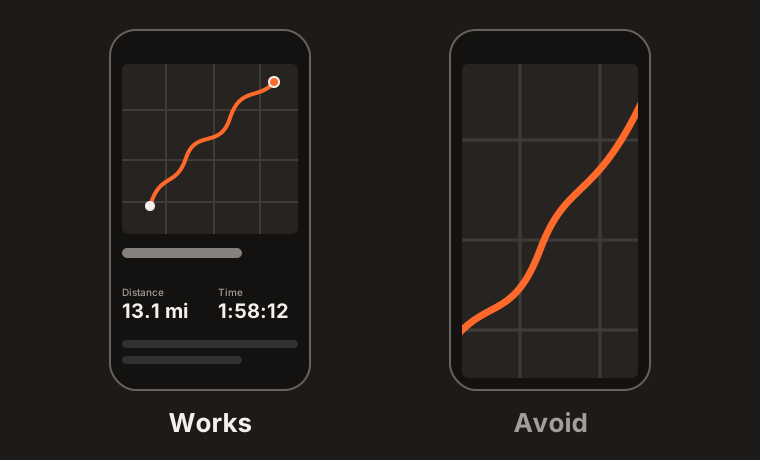
Open the activity, make sure the whole route line and the stats (distance and time) are on screen at once, and take a normal screenshot with your phone or computer. Do not zoom into the map. One image with the map on top and the stats below is ideal.
On a phone
- Open the Strava app and tap the activity.
- Stay on the activity page, where the map sits above the stats. Do not open the full-screen map.
- Check that the whole route line is visible and that the distance and the time are on screen.
- Take a screenshot the way your phone does it: the side button and volume up on most iPhones, power and volume down on most Android phones. Apple and Google each have a short guide: screenshot on an iPhone, screenshot on Android.
On a computer
- Open the activity on strava.com.
- Scroll so the map and the main stats are both on screen.
- Take a screenshot of that area with your system’s screenshot tool: on a Mac, on Windows.
A friend’s activity
If you follow them on Strava, open their activity and take the same screenshot. If you do not, a screenshot they posted on Instagram, Facebook or in a group chat works too, as long as it shows the route and the stats.
You can also ask them to send you a screenshot of the race. They do not need to know why.
Once you have it, upload the screenshot to see the print, or read how a Strava run becomes a framed print.

What makes a screenshot work well
- Whole route
- Start and finish both inside the map
- Stats visible
- Distance and time on screen
- No zoom
- The default map view, not a zoomed section
- Not cropped
- The full screen is better than a tight crop
- File
- PNG, JPG or WebP, up to 4 MB
Questions
- What if a medal badge or a photo covers part of the route?
- Upload it anyway. The hidden stretches of the course are joined, and you can review the joins before ordering.
- What if the time or the date is not in the screenshot?
- Type it in by hand after uploading. Every detail on the print can be edited.
- Does a screenshot from the Strava website work?
- Yes, as long as the route and the stats are both in the image.